
delphi win10系统通知 NotificationCenter1 基本用法
需要组件:NotificationCenter1
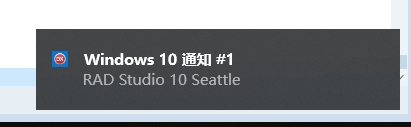
演示:
procedure TNotificationsForm.btnCancelAllClick(Sender: TObject);
begin
NotificationCenter1.CancelAll;
end;
procedure TNotificationsForm.btnCancelAnotherClick(Sender: TObject);
begin
NotificationCenter1.CancelNotification('Windows10通知2');
end;
procedure TNotificationsForm.btnCancelClick(Sender: TObject);
begin
NotificationCenter1.CancelNotification('Windows10通知');
end;
procedure TNotificationsForm.btnShowAnotherClick(Sender: TObject);
var
MyNotification: TNotification;
begin
MyNotification := NotificationCenter1.CreateNotification;
try
MyNotification.Name := 'Windows10通知2';
MyNotification.Title := 'Windows 10 通知 #2';
MyNotification.AlertBody := 'RAD Studio 10 Seattle';
NotificationCenter1.PresentNotification(MyNotification);
finally
MyNotification.Free;
end;
end;
procedure TNotificationsForm.btnShowClick(Sender: TObject);
var
MyNotification: TNotification;
begin
MyNotification := NotificationCenter1.CreateNotification;
try
MyNotification.Name := 'Windows10通知';
MyNotification.Title := 'Windows 10 通知 #1';
MyNotification.AlertBody := 'RAD Studio 10 Seattle';
NotificationCenter1.PresentNotification(MyNotification);
finally
MyNotification.Free;
end;
end;
procedure TNotificationsForm.NotificationCenter1ReceiveLocalNotification(
Sender: TObject; ANotification: TNotification);
begin
mmLog.Lines.Add('收到的通知: ' + ANotification.Name);
end;
Copyright © 2014 DelphiW.com 开发 源码 文档 技巧 All Rights Reserved
晋ICP备14006235号-8 晋公网安备 14108102000087号
执行时间: 0.029631853103638 seconds