
delphi D10.X 并行库PPL编程之 Futures
Delphi D10.X 并行库PPL编程系列之 Futures
delphi中的RTL(运行库)提供了并行编程库(PPL --Parallel Programming Library) ,让您的应用程序可以在跨平台应用中有效的使用多个CPU并行运行任务的能力。
Futures 让流程专注于其他任务,然后在所需的位置获得该流程的结果。IFuture允许您为运行的代码块建立优先级,并在需要时仍返回结果。
Futures 说明
Future接受一个能够在并行线程中运行的函数,并返回一个接口,该接口用于在程序中所需位置获取结果。
Future方法将IFuture的实例返回到类型T定义的变量中。类型参数T表示要在并行线程中运行的函数的返回类型。
以下是不同的重载方法:
class function Future(Sender: TObject; Event: TFunctionEvent): IFuture; overload; static; inline;
class function Future(Sender: TObject; Event: TFunctionEvent; APool: TThreadPool): IFuture; overload; static; inline;
class function Future(const Func: TFunc): IFuture; overload; static; inline;
class function Future(const Func: TFunc; APool: TThreadPool): IFuture; overload; static; inline;
Futures演示
使用Futures时,将会在需要时获得此值,如果尚未计算,它将阻塞直到完成。
演示中使用到的控件
只需要两个按钮控件,其中一个用于启动计算,另一个用于获取计算执行结果。
添加使用单元
首先,我们需要引用PPL库:
uses
System.Threading; // 需要引用PPL库
设置一个变量
public
{ Public declarations }
FutureString: IFuture;
分别为两个按钮增加处理事件
{======================= Future 演示 ========================================}
procedure TForm5.Button4Click(Sender: TObject);
begin
FutureString:= TTask.Future(
function:string
begin
{暂停一段时间,模拟需要计算的处理时间 }
Sleep(3000);
Result:='Hello ' + Random(42).ToString;
end);
end;
procedure TForm5.Button5Click(Sender: TObject);
begin
Button5.Text := FutureString.Value;
end;
{======================= Future 演示 ========================================}
演示效果
————————————————
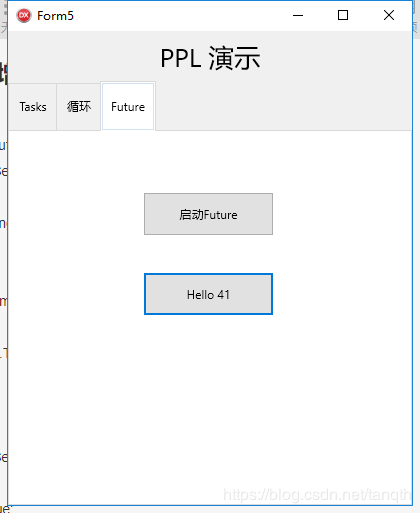
点击启动按钮后,在3秒内点击获取结果后,会阻塞直到我们程序里的3秒结束后,返回一个42以内的随机数。
原文链接:https://blog.csdn.net/tanqth/article/details/104554661
推荐分享
图文皆来源于网络,内容仅做公益性分享,版权归原作者所有,如有侵权请告知删除!
Copyright © 2014 DelphiW.com 开发 源码 文档 技巧 All Rights Reserved
晋ICP备14006235号-8 晋公网安备 14108102000087号
执行时间: 0.033322095870972 seconds