
delphi 解析句子中的单词
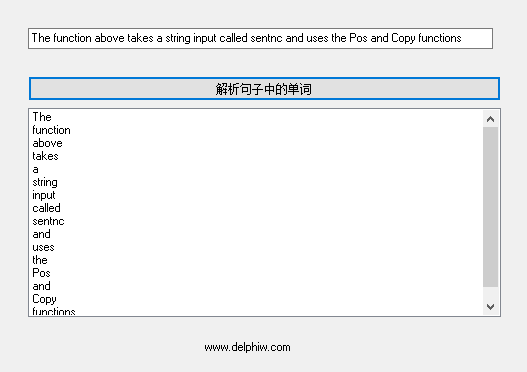
unit main;
interface
uses
Windows, Messages, SysUtils, Classes, Graphics, Controls, Forms, Dialogs,
StdCtrls, Grids;
type
TForm1 = class(TForm)
ListBox1: TListBox;
Button1: TButton;
Edit1: TEdit;
Label1: TLabel;
procedure Button1Click(Sender: TObject);
private
{ Private declarations }
public
{ Public declarations }
end;
var
Form1: TForm1;
implementation
{$R *.DFM}
function FillList(sentnc : String; {Input string}
var sList : TStringList; {String List to add values to}
clearList : Boolean) {Clear list before adding?}
: Boolean; {Return value}
var
str,
wrd : String;
I : Word;
begin
{Initialize vars}
Result := True;
str := sentnc;
wrd := '';
{Check to see if the string passed is blank}
if (Length(sentnc) = 0) then
begin
MessageDlg('Passed an empty string', mtError, [mbOk], 0);
Result := False;
Exit;
end;
{Clear the list if wanted and the count of values is > 0}
if clearList AND (sList.Count > 0) then
repeat
sList.Delete(0);
until
sList.Count = 0;
while (Pos(' ', str) > 0) do {Do this while you find}
begin {spaces in the sentence}
wrd := Copy(str, 1, Pos(' ', str) - 1); {Get the word from the string}
sList.Add(wrd); {Add the word to the TStringList}
str := Copy(str, Pos(' ', str) + 1, {Redefine the sentence by cutting}
Length(str) - Length(wrd) + 1); {off the first word}
end;
if (Length(str) > 0) then {This is important, because you never}
sList.Add(str); {know if there's anything left in the
sentence.}
end;
procedure TForm1.Button1Click(Sender: TObject);
var
I : Integer;
strList:tstringlist;
begin
strList := TStringList.Create;
{Fill the list}
if FillList(Edit1.Text, strList, True) then
begin
repeat
ListBox1.Items.Delete(0);
until
ListBox1.Items.Count = 0;
for I := 0 to strList.Count - 1 do
ListBox1.Items.Add(strList.Strings[I]);
end;
strList.Free;
end;
end.
Copyright © 2014 DelphiW.com 开发 源码 文档 技巧 All Rights Reserved
晋ICP备14006235号-8 晋公网安备 14108102000087号
执行时间: 0.15039205551147 seconds